MongoDB for beginners

First lets try to undertand what is NoSQL?

NoSQL Database is used to refer a non-SQL or non relational database.

It provides a mechanism for store and receive data other than tabular relations model used in relational databases. In other words ,NoSQL database does not use tables for storage of data. It is generally used to store big data and real-time web applications.

Now what is MongoBD?

MongoDB is a NoSQL(Not only Structured Query Language) database program, which is cross-platform document-oriented. It is an open source database management system, which supports various forms of data.

Its useful in big data applications that deals with  large volume of data and also for the processing of unstructured data.The architecture of MongoDB consists of collections and documents. It uses document storage BSON format (binary form of JSON).

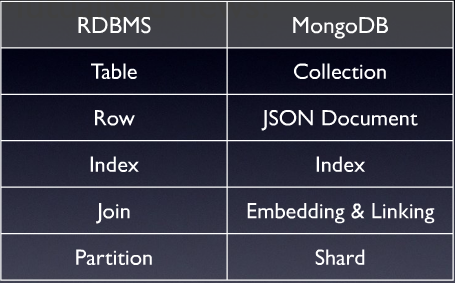
MONGODB VS RDBMS
  • RDBMS has a database of relations, but MongoDB has a database of non-relations
  • We need to design the table in RDBMS and then only we can only start coding, 
    but we can start coding directly in MongoDB.
  • RDBMS supports SQL language where as MongoDB supports both SQL as well as JSON query language.
  • RDBMS is based on tables and rows and MongoDB is based key-value and documents .
  • Compared to MongoDB unstructured data, RDBMS processes data very slowly.
  • MongoDB is horizontally scalable, where as, RDBMS is vertically scalable.
GIT

HERE IS A SIMPLE GUIDE FOR GIT πŸ™‚

Git is a version control system, which makes it easier to track file changes. 
For example, git can help you determine exactly what has changed, who has changed it, and why when you edit a file. It’s useful when coordinating developing a program with a team of people on a project, and for tracking progress.

GIT Terminologies

Repository : Central location where all of the files are stored. 

Trunk : This is where the most stable code is placed which is called as the production code. ( Also known as master branch)

Stage : Mark files for tracking changes.

Commit : Creates a snapshot of the file changes that are made.

Merge: Combine branches together to update the master branch.

Checkout : Obtain file for changing.

Branch : Copy of the branch master taken at a particular point. All developments in 
features and corrections of bugs will be done in a branch. Usually multiple branches are allowed at the same time.

Merge conflict : It happens when a file that has been changed in two separate branches or 
places is combined. Changes interfering with other changes.

JavaScript

WHAT IS JAVASCRIPT?

JavaScript is one of the world’s most popular programming languages for web,  As a web developer, you can use JavaScript to build web and mobile apps, real-time networking apps and games. JavaScript is used mainly to make web pages more lively and interactive

WHAT CAN JAVASCRIPT DO IN A WEB PAGE?

  • Scripts gives a programming tool to HTML designers
  • JavaScript can put dynamic text into an HTML page
  • JavaScript can react to events
  • JavaScript can read and write HTML elements
  • JavaScript can be used to validate data
  • JavaScript can be used to store and retrieve information on the visitor’s computer (Cookies)
  • JavaScript can be used to detect  the visitor’s browser
  • A JavaScript can be used to detect the visitor’s browser-load a specific page designed for that browser.